
RMA Procedure Step by Step: 5 Stages of a Return
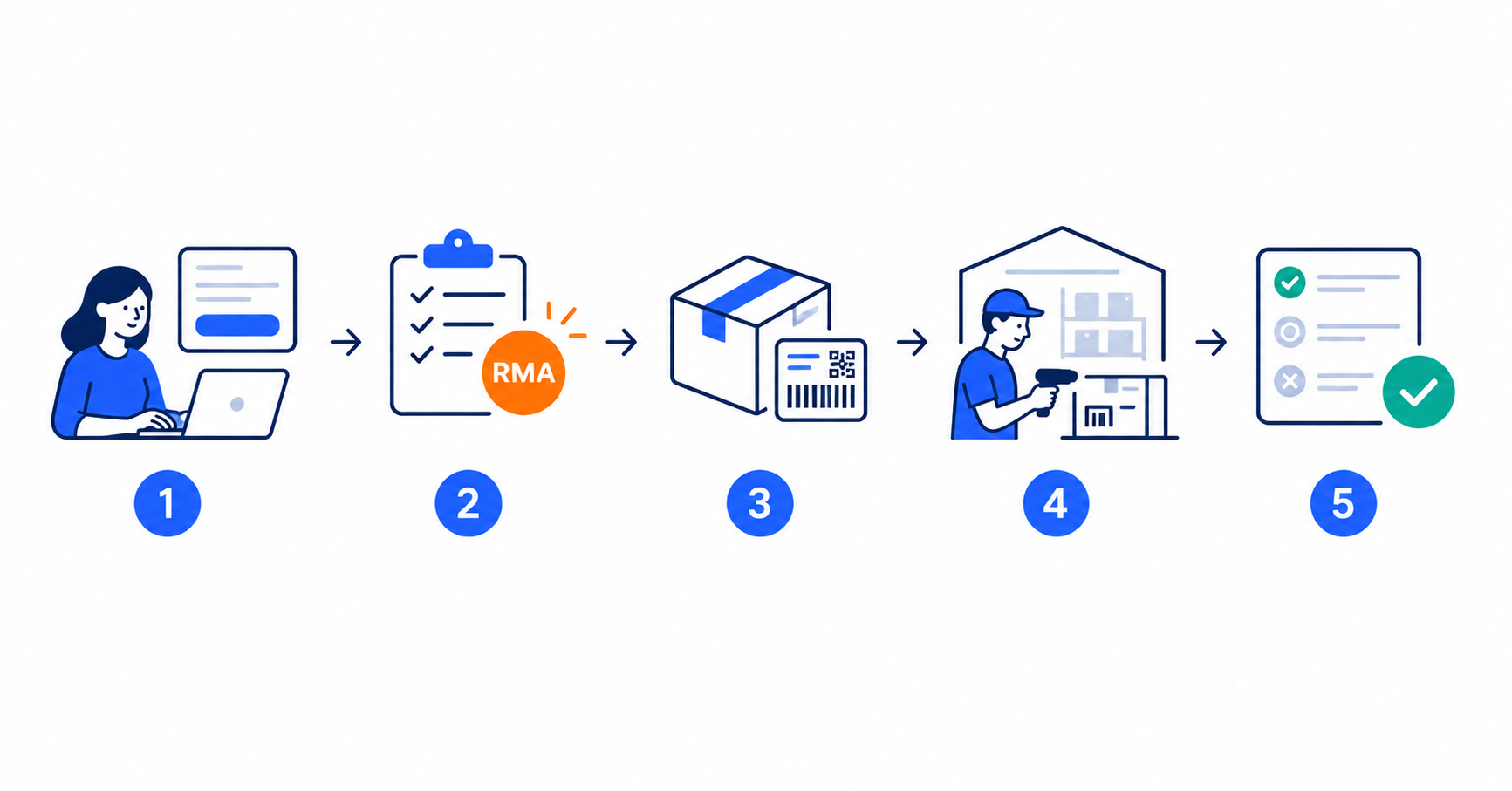
A store that sells will sooner or later start receiving as well. A return, an exchange, a warranty claim - each of them travels the same repeatable path, the one the industry calls the RMA procedure. It has five stages, and something can be automated in every one of them.
Below we walk that procedure step by step: what the customer does at each stage, what the store does, where the process usually stalls, and which task can be handed over to software. If you are looking for an explanation of the acronym itself, we have a separate article on that: what is RMA. This one is only about how it runs.
The RMA procedure in brief
The classic RMA procedure consists of five stages:
- Return or claim request - the customer fills in a form, giving the reason and the order details.
- Approval and RMA number assignment - the merchant reviews the request and assigns it a unique number.
- Shipping the goods back - the buyer sends the parcel with the RMA number on the label or somewhere visible.
- Receiving and inspection at the warehouse - staff assess the condition of the product and whether it matches the request.
- Decision and closure - repair, exchange, refund or rejection of the claim, together with a message to the customer.
At the heart of the whole path is the RMA number: a reference code tied to one specific product and one specific return case. It is what binds the customer’s request, the physical parcel in the warehouse and the merchant’s decision into a single story.
This procedure works the same way in a store with ten returns a month and in one with a thousand. The difference is how much of it a human does. With manual handling - a PDF form, an inbox, a spreadsheet - every one of the five stages needs somebody’s attention. Below we show what happens at each of them in a returns management system such as RetJet.
Step 1. A request the customer can complete without creating an account
The biggest drop-off in the whole procedure happens right at the start: the customer cannot find the form, cannot remember the password to their account, or has no printer to print the declaration. Some of those people never return the goods at all - and never come back to the store either.
In RetJet the customer goes through the request in a self-service portal, with no login. An order number and an e-mail address are enough for the system to pull the order data and show the purchased items to choose from.
- Legal compliance. The form includes the right of withdrawal button required by EU Directive 2023/2673, in force since 19 June 2026. If you want to check where your store stands, we have a page on directive compliance in practice.
- The customer picks the resolution. Instead of a default “send it back, give me my money”, the customer says what they actually want: a refund (bank transfer or BLIK), an exchange for a different size, or a gift card with a bonus, for example +10% of the value. The last two keep the money in the store rather than closing the case with a transfer.
Step 2. Approval and RMA number assignment
This is the stage that most often sits in a queue waiting for a human decision. The merchant checks whether the return is within the deadline, whether the product is eligible at all, and whether the request is complete.
Most of those decisions are repeatable, so they can be written down as rules. In RetJet you define lists of EAN or SKU codes and attach automatic actions to them: a request for a given product group is accepted immediately, blocked with a message for the customer (“we do not accept this product for return, because…”), or sent back for more detail before anyone picks it up.
The effect works in both directions: the operator only reviews the unusual cases, and the customer learns the decision right away instead of waiting two days for an e-mail.
Step 3. Sending the goods back without a printer
The RMA number is assigned, so the parcel can move. The classic version assumes the customer will print a label and stick it on the box. A large share of buyers have no printer at home, which makes this a real obstacle rather than a formality.
RetJet supports sending a return without printing a label: right after the request the customer receives a return code or a QR code on their phone and uses it to drop off the parcel, for example at an InPost parcel locker.
The store does not lose control over shipping cost in the process. Merchants with negotiated rates of their own connect their own carrier contracts - InPost, DPD, DHL - or use the rates available in the platform.
Between steps 3 and 4: parcels that have not arrived yet
In the classic description of the RMA procedure there is a gap between dispatch and receipt: the parcel is in transit and nobody knows anything about it. For the warehouse that means tomorrow’s intake volume is an unknown.
RetJet shows return shipments while they are still in transit - including those sent directly, with no prior request in the system, for instance through Wygodne Zwroty or InPost Quick Returns. On Friday the warehouse manager knows how many parcels are coming on Monday and plans the team’s work instead of reacting to whatever shows up.
Step 4. Receiving and inspection at the warehouse
The parcel reaches the store. Before anyone assesses the condition of the product, one simple question has to be answered: whose parcel is this and which case does it belong to. With manual handling that means searching by surname, order number or contents - the most expensive minute in the whole procedure, multiplied by the number of intakes.
RetJet allows label-based parcel identification: the employee scans the carrier label number or types it into the search box, and the system immediately matches the physical shipment to the RMA request and the sales channel it came from. Only then does the actual inspection begin: technical condition, completeness, and whether it matches what the customer declared.
Step 5. Decision, settlement and one place for every case
The last stage is the decision: refund, exchange, repair or rejection of the claim - always with a message to the customer and a history you can go back to in a dispute.
The problem shows up when a store sells in several places at once. Returns from a marketplace are handled differently from returns from your own store, and cases coming from carrier services differently again - and suddenly the same RMA procedure runs on three tracks, with three sets of statuses.
This is what the industry means by an RMA system: one place where every request is visible, with no switching between panels. We gave that capability a page of its own - a shared dashboard for all RMA requests - because it decides whether the five steps above run on one track or several.
RetJet collects requests and the history of contact from every sales channel in a single dashboard, with one set of statuses. It makes no difference whether the case came from Allegro, from your store on Shopify, Shoper, WooCommerce or PrestaShop, or from an external system. If you run several stores at once, this is precisely the stage that decides whether you have one procedure or three.
Manual versus automated: what changes at each stage
| Stage | Manual handling | Automated handling |
|---|---|---|
| 1. Request | PDF form, e-mail, retyping data | Portal with no login, order data pulled automatically |
| 2. Approval | Every case waits for a human decision | EAN/SKU rules settle repeatable cases immediately |
| 3. Dispatch | The customer prints a label | A code or QR code on the phone, drop-off without a printer |
| - | The parcel “disappears” while in transit | A view of shipments in transit, including those with no request |
| 4. Receipt | Searching for the case by surname and contents | A carrier label scan points to the request |
| 5. Decision | Separate statuses in every sales channel | One dashboard and one set of statuses for all channels |
How long it takes to get this procedure running
Setting it up requires no developer and no agency. Connecting to your store’s ecosystem happens through a ready-made integration or an API key - with BaseLinker or Shopify, for example - and usually takes under 10 minutes.
The system uses a lightweight integration while doing so: order data is fetched over the API only at the moment the customer files a return. There is no importing of orders “just in case” and no second copy of your store’s database.
Once the procedure is running, it starts producing data: reports on return volumes, handling times per stage, and costs broken down by channel and carrier. Those are what show you which of the five steps takes longest in your store.
Frequently asked questions
What is an RMA number? It is a unique reference code assigned to one specific product and one specific return case. It lets you tie the customer’s request, the physical parcel and the store’s decision into a single, reconstructable history.
How many stages does the RMA procedure have? Classically five: the request, approval and RMA number assignment, shipping the goods back, inspection at the warehouse, and the decision and closure. The order is fixed; how many of those stages a human handles depends on your tools.
Is the RMA procedure required by law? The procedure under that name is not. What is required are the obligations it organises: the consumer’s right to withdraw from a distance contract and, since 19 June 2026, an easily accessible withdrawal button under EU Directive 2023/2673.
What is the difference between a return and a warranty claim in the RMA procedure? The path is similar, but the legal basis and the deadlines differ: a return is a withdrawal from the contract with no reason given, while a warranty claim concerns a defect and has its own response deadlines. That is why a warranty claims management system runs them as a separate case type, even though they live in the same dashboard.
Summary
The RMA procedure is five stages that look the same in every store - what differs is only how much manual work they consume. Automation does not change that path, it just takes the repeatable fragments off the team: filling in data, approving the obvious requests, hunting for a parcel in the warehouse and keeping track of statuses across several panels at once.
Want to see what this looks like on your own returns? RetJet has a free plan to start with: 25 requests a month, no card and no commitment.