
Returns management system for online stores
Handle returns from connected sales channels in one dashboard. Give customers a return form and manage shipping, statuses and warehouse receiving in RetJet.
Bring returns from your connected sales channels into one RetJet dashboard. See who submitted a request, whether the parcel has arrived and which team member is handling it. The customer conversation stays with the case.
What a returns management system does
A returns management system helps an online store collect requests, arrange return shipping and receive goods at the warehouse. Staff can see the request alongside shipment details and earlier customer messages, without piecing them together from an inbox, spreadsheet and carrier portal.
The main parts are a return form, channel-specific rules, request statuses, shipping and tracking, and a contact history. We explain the industry term on the shared RMA dashboard page.
A return from request to settlement
- The customer submits a return. They provide order details and select the products in the form.
- They prepare the parcel. They use one of the shipping methods offered by the store.
- Your team checks progress. Staff can see the request, shipment status and conversation.
- The warehouse receives the goods. A worker identifies the parcel from its label and checks the contents.
- The store handles settlement. The team updates the status and tells the customer what happens next.
Connected channels in one dashboard
When you sell through your own store and a marketplace, requests arrive from different sources but the same team handles them. RetJet brings cases from connected channels into one view. Filter them by channel, status, request type or date.
The request list includes details such as the customer, amount, deadline and assigned team member. Someone taking over a case can see its current state instead of reconstructing it from separate emails and notes.
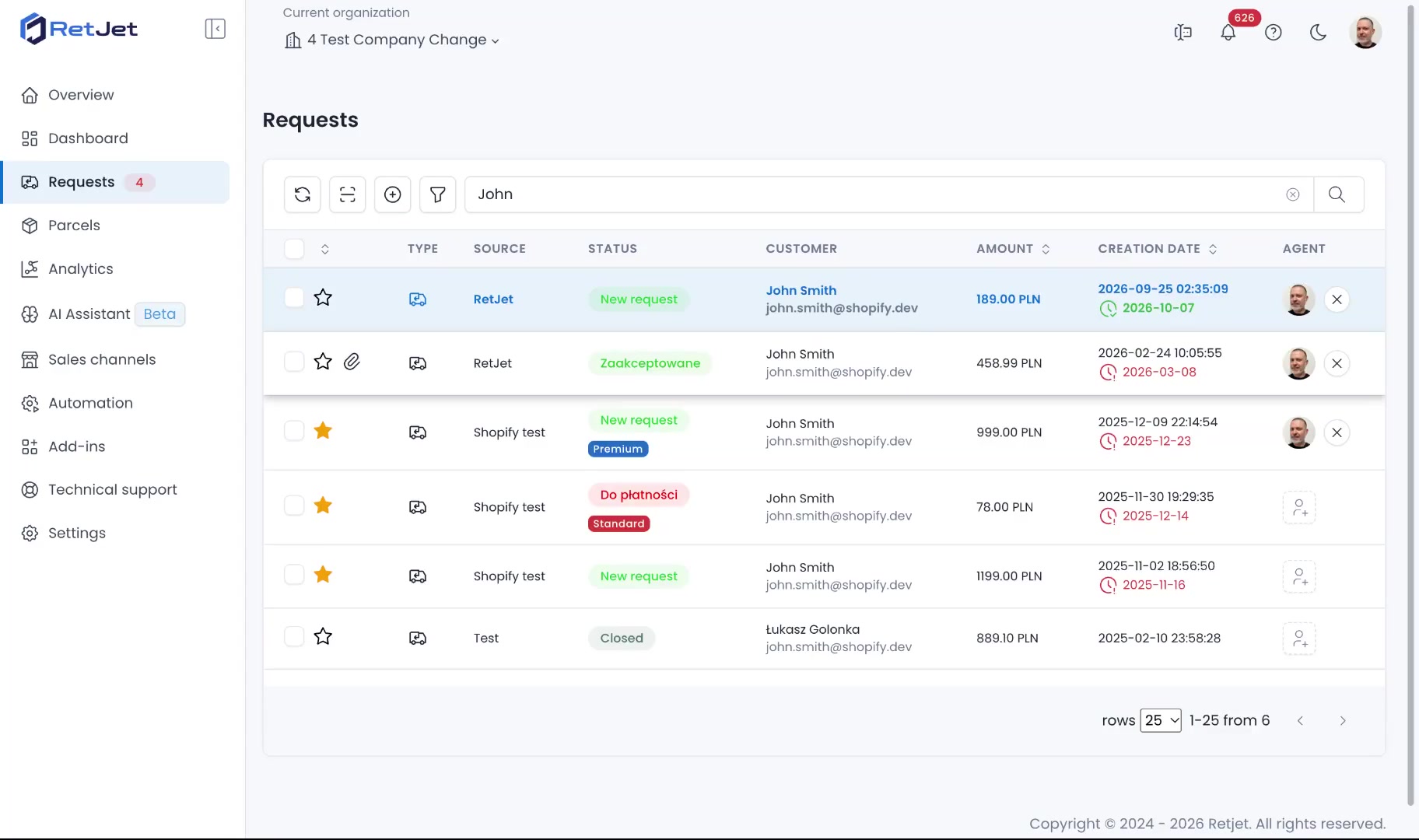
The list brings together cases at different stages and the people handling them.
Check the available connection for your platform and carriers in the integration directory.
Your form and return rules
Customers can submit a request without creating an account. For supported order lookups, they enter their order number and email address, then select the products. Your team receives structured information without copying it from a paper form.
Set rules separately for each sales channel, including submission windows, return addresses and form questions. Product-specific rules can add conditions based on SKU or EAN; these are not available for Allegro or the basic integration without order imports.
Settings should reflect your store’s process and applicable rules. See the return and claim form for publishing and configuration options.
A shipping code or label
After submitting a request, customers use the shipping methods you make available. Depending on the integration, they receive a shipping code or a label. Printerless shipping is available with methods that support a code or QR code.
You can use supported carrier accounts of your own or shipping services under RetJet’s contracts. Available methods and costs depend on the connected service and your configuration.
Track returning parcels
The dashboard shows parcels in transit and those that have arrived. That helps you prepare for deliveries and answer questions about a return’s location. An estimated delivery date appears when that information is available.
Supported integrations can also bring in parcels sent without a prior RetJet request, for example through the Polish services Wygodne Zwroty or Szybkie Zwroty InPost.
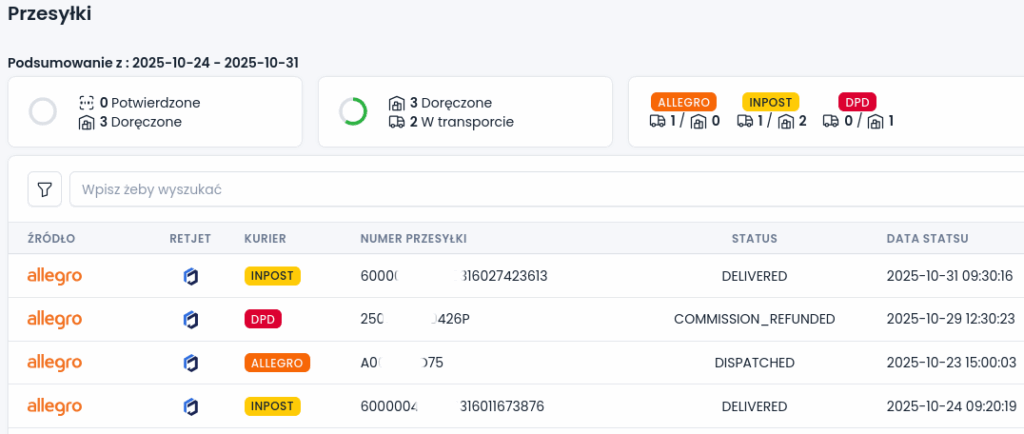
Shipment information helps the team distinguish a parcel in transit from one delivered to the store.
Receive goods by scanning the label
A worker scans a code or enters the label number to find the linked case. They can then open the parcel and compare the products with the request.
If a parcel has no linked request, the worker needs to establish who sent it and what the return concerns. Receiving it from the carrier does not complete that check.
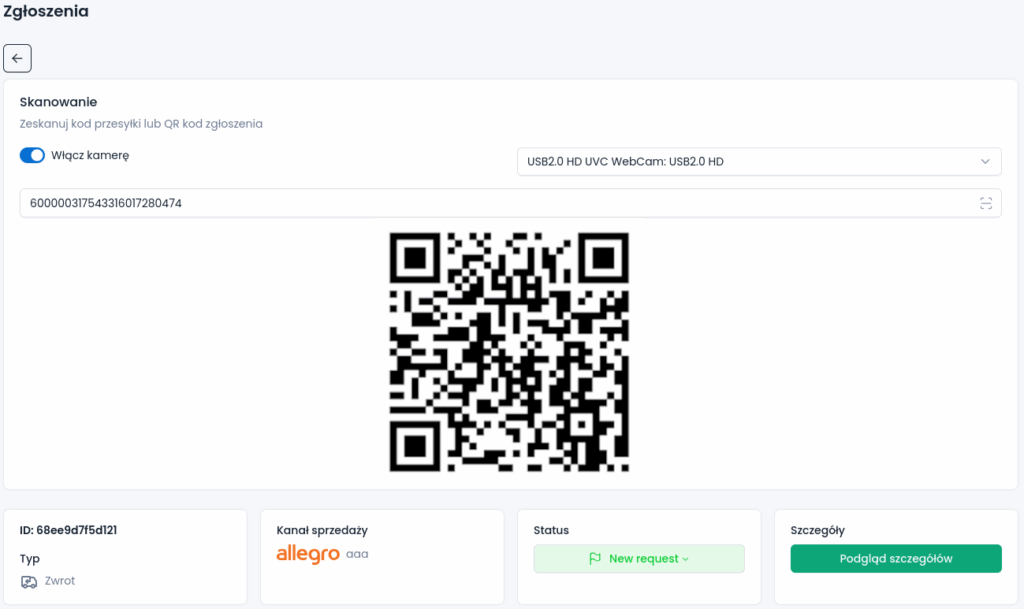
Find the linked request before inspecting the goods.
Statuses, messages and automatic rules
Correspondence stays with the request. Customers can check their case status, and staff can read earlier agreements. You can link statuses to email templates so a status change sends the prepared message to the customer.
An automatic rule can also assign a new request to a team member based on its channel or type. Receiving the parcel, checking the goods and completing the refund are separate steps. Set statuses that make the next action clear to both your team and the buyer.
When a store needs this tool
RetJet is useful when you handle dozens of requests a month or more and processing them takes up team time. One sales channel is enough. With several channels, or handovers between customer service and the warehouse, the shared view also helps preserve the case history.
If you only handle a few returns a month, first check whether your store platform’s built-in tools are sufficient. Compare staff time, supported integrations and subscription cost before choosing a separate system.
Returns and product claims
A change-of-mind return and a claim about faulty goods have different grounds and workflows. RetJet treats them as separate request types handled in the same dashboard. See the claims management system for defect reports, photos and the review process.
Pricing and getting started
RetJet uses subscription plans with an allowance of requests. Current prices, limits and additional charges are listed on the pricing page.
Create an account, connect a supported sales channel and publish the form. Then configure your rules, shipping methods and team statuses. The quick setup guide explains the available ways to connect.