
Returns From Multiple Allegro Accounts in One Place
Several Allegro accounts and returns slipping through? RetJet gathers requests from every account into one dashboard and shows what needs action.
You sell from several Allegro accounts, because each one handles a different brand or a different team. Sales work fine, but returns scatter across as many inboxes and tabs as you have accounts.
What the problem is
Returns and warranty claims sit separately on each account, and reviewing them means switching between accounts. There’s no single place showing how many cases are waiting and which one has been sitting the longest.
On top of that comes a question that’s hard to answer quickly: has the customer’s package already arrived, or is it still on its way. With one account, you can more or less keep this in your head. With several, individual cases start slipping through, usually the ones somebody left “for later”.
How this looks in RetJet
You connect all your Allegro accounts to a single dashboard. From that point on, every request lands in the same place, with clear information about which account it came from.
From there you work from a single list:
- you see the shipment status, whether it’s in transit or has reached the warehouse,
- once the package arrives, you link it to the request instead of figuring out what it is,
- you close the case with a refund, an exchange, or a message to the customer.
Each account is a separate sales channel in RetJet. The list shows which account a request came from, and you can narrow it to one account when someone is responsible for a single brand.
Where requests come from
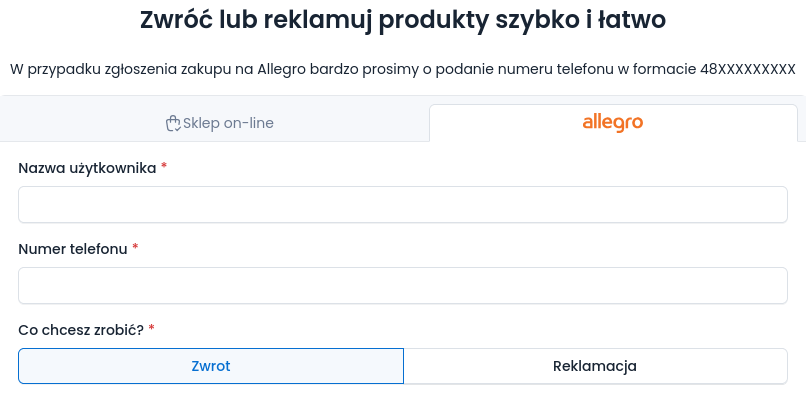
Returns reach the dashboard in two ways. RetJet imports returns that buyers report on Allegro, from every connected account. Buyers can also use the RetJet return form, where they pick the Allegro tab and enter their username and phone number, and the system finds the right order.
Either way, the request lands on the same list, assigned to the account the buyer purchased from.
Settling without switching accounts
After checking the goods, you issue the refund through the Allegro integration from the request, without logging into the account the sale came from. You settle specific items and quantities, so a partial return does not need a side calculation.
From the same request you send the commission refund request. With several accounts this matters, because the request has to be filed within 45 days of the purchase, and returns spread across accounts are easy to miss.
What changes in day-to-day work
One list instead of several tabs. You don’t have to remember which account you left an unfinished case on, because they’re all side by side.
Fewer mistakes at receiving. The package is linked to a specific request and a specific account, so nobody has to open it to work out whose it is.
You can see what’s waiting on a decision. Instead of scanning through everything in order, you look at the cases where the ball is in your court.
Assignment by account. Automatic rules can use a sales channel condition. Returns from one brand’s account go straight to one person, and from another brand’s account to someone else, without sorting them by hand.
What you need to get started
Connecting each Allegro account only takes authorizing it in RetJet, the same as with a single account. You add accounts one by one, and there’s no limit to how many.
If you also sell through your own store besides Allegro, those requests land on the same list. See the available integrations to check whether your platform is among them.