
How to connect WooCommerce
Set up the WooCommerce integration with RetJet step by step. Covers creating an API key and granting read-only permissions.
WooCommerce authorizes integrations with a pair of keys: a public one and a secret one. RetJet needs such a pair with read-only permission, because the only thing it does is fetch the order the moment a return is submitted.
Generate an API key in WooCommerce
- Go to the WordPress admin panel.
- Go to ‘WooCommerce’ > ‘Settings’.
- Go to the ‘Advanced’ > ‘REST API’ tab.
 4. Click ‘Add key’.
5. Give it a description, choose a user, then set the permissions to ‘Read’.
4. Click ‘Add key’.
5. Give it a description, choose a user, then set the permissions to ‘Read’.
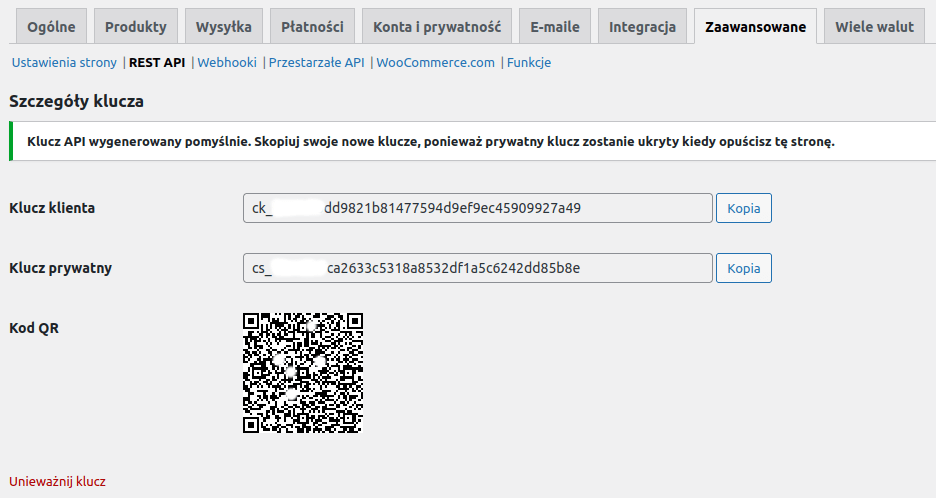
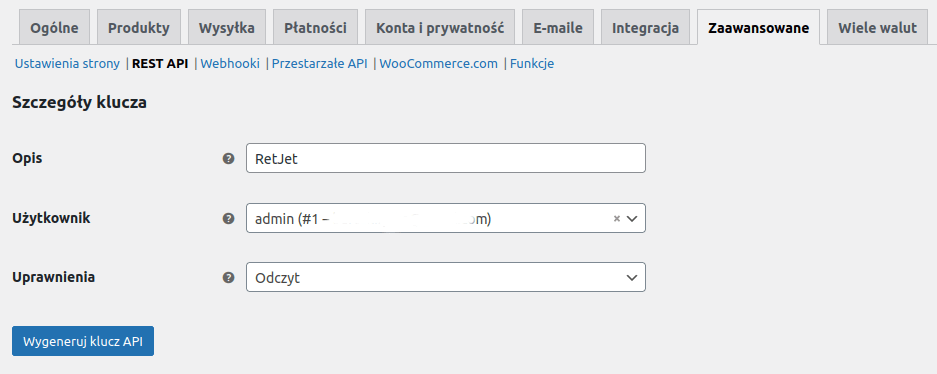 6. Save to generate the API keys.
Don’t have a RetJet account yet? Create a free account.