
Automated Returns Processing: What to Automate and How

A return passes through the same steps every time. The customer asks to send something back, someone checks the order, the customer needs a label, the parcel travels back, the warehouse receives it and someone issues the refund. Most of the time spent on returns goes into the handovers between those steps, not into the decisions.
Automated returns processing means letting the system carry those handovers. People still decide whether a product can be resold or whether a claim is justified. The system makes sure the case reaches them with everything they need.
Where returns lose time
In a store without a returns tool, a typical return looks like this. The customer writes an email. Someone finds the order in the store admin and replies with instructions. The customer asks for a label, gets it a day later and prints it. A week later a parcel arrives with no note inside, so the warehouse opens it and searches for the order by name. Then someone asks the office whether the refund can go out.
None of these steps is hard. Each one waits for a person who is doing something else, and each one is a place where a case can be forgotten. That is what automation removes.
What to automate first
The request
A return form on your store’s domain replaces the email thread. The customer enters the order number and email address, picks the products and the reason, and the request is created already linked to the order. Nobody copies order numbers by hand.
The label
Once the request is submitted, the customer gets a shipping code or a label straight away. With a code they can drop the parcel at a locker or pickup point without a printer. See printerless returns.
Tracking
The shipment number is saved on the request, so you can see which parcels are on their way before they arrive. The customer gets an email with a status link and does not need to ask support where things stand.
Receiving
The warehouse scans the label and the system opens the right request. The parcel no longer has to be unpacked to find out who sent it. This is described in label-based parcel identification.
Routing and statuses
Rules take over the repetitive moves inside the dashboard: assigning a new return to the right person, changing the status when the warehouse scans a parcel, adding a watcher to claims from a given channel.
Rules: events, conditions, actions
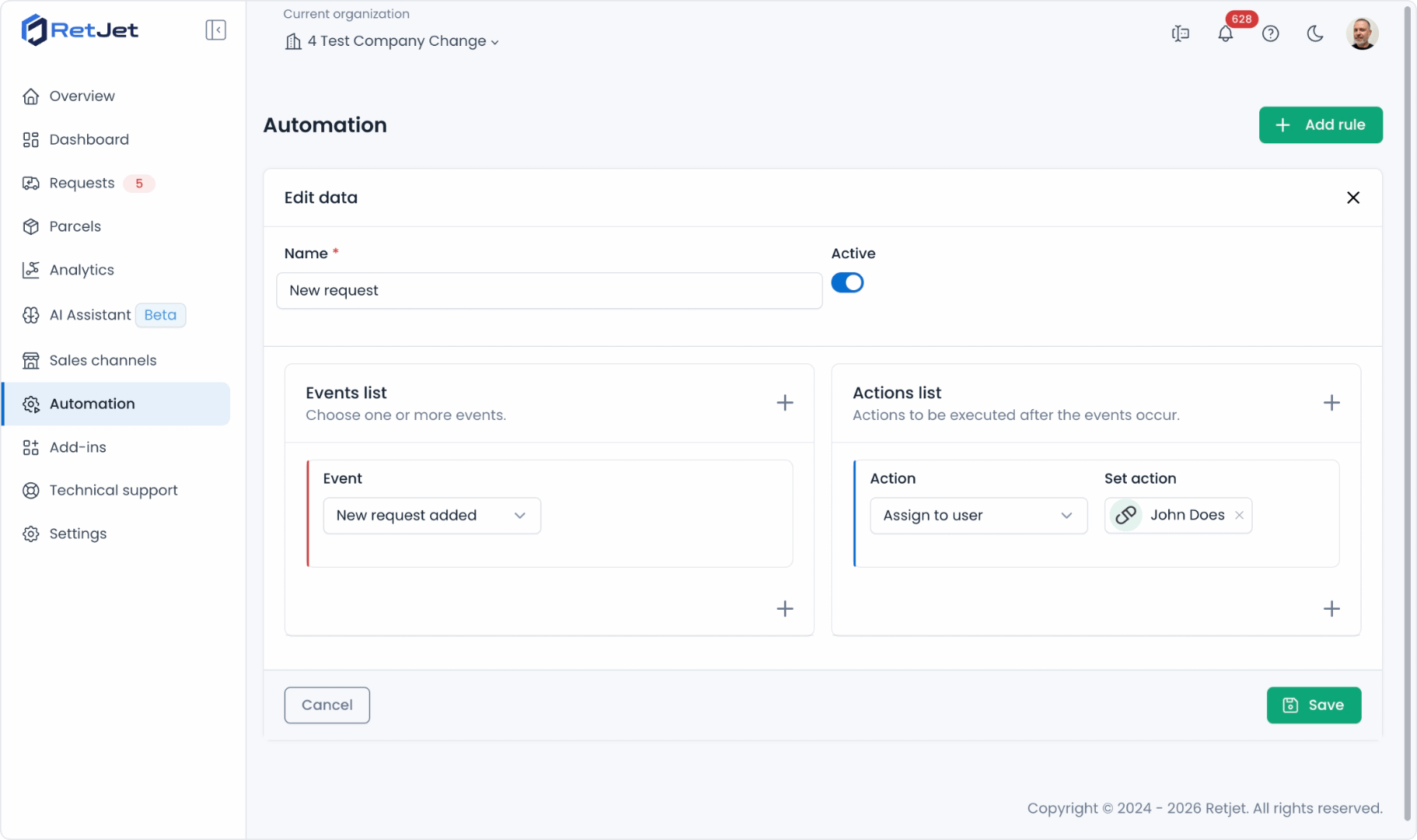
In RetJet, a rule says when to act and what to do. The event can be a new request, a status change or a scan of the request’s QR code. Conditions narrow it down, for example to returns only, or to one sales channel. Actions change the status, assign a team member or add someone as a watcher.
Two examples show the idea. A rule for new requests sends returns to one person and claims to another. A rule for the QR scan moves the request to your receiving stage and assigns it to the person who inspects the goods. The details are on the page about returns workflow automation.
What to keep manual
Automation is good at moving cases between people. It is not good at judging them. Keep these steps with your team:
- inspecting the returned product and deciding whether it can be resold,
- deciding on warranty claims, where the condition of the product matters,
- exceptions, such as a return after the deadline that you want to accept anyway.
The goal is that these decisions are the only thing your team does by hand. Everything around them, from the request to the refund instruction, should already be in place when they open the case.
One process for every channel
Automation helps most when returns come from more than one place. If your store, a marketplace and a second shop each have their own way of handling returns, every rule you set up covers only part of the work. When all requests land in one dashboard, the same statuses, rules and notifications apply to all of them, and the list shows which cases are waiting for you, whatever channel they came from.
How to start
Pick one repetitive step and automate only that. For most stores it is either assigning new requests or updating the status after the parcel is scanned. Check the rule on a test request, including one that should not match its conditions. When the first rule works as expected, add the next.
If you want to see the full flow from request to receiving, look at the returns management system page or create a free account and try it on your own orders.