
Product-specific return rules
Match form questions and messages to products by SKU or EAN. Set submission rules for each supported sales channel connected to RetJet.
Ask questions that fit the product
For a backpack claim, you need to know which part is damaged. Another product may need different questions. RetJet lets you add questions and messages for selected products instead of showing every customer the same long form.
Product rules also control whether the form allows a request for a selected item. Rules belong to a sales channel, so stores connected to one RetJet account can use different settings.
Match products by SKU or EAN
Add a list of SKU or EAN codes to a rule. RetJet compares that list with the product details in the order. A match determines whether the rule applies.
One list can cover products that need the same questions or messages. The order must contain matching product codes for the rule to work.
Collect product-specific details
Add questions for the buyer to answer. For backpacks, for example, ask whether the problem concerns the zip, fabric or strap, then request a description of the symptoms. Your team receives those answers with the request.
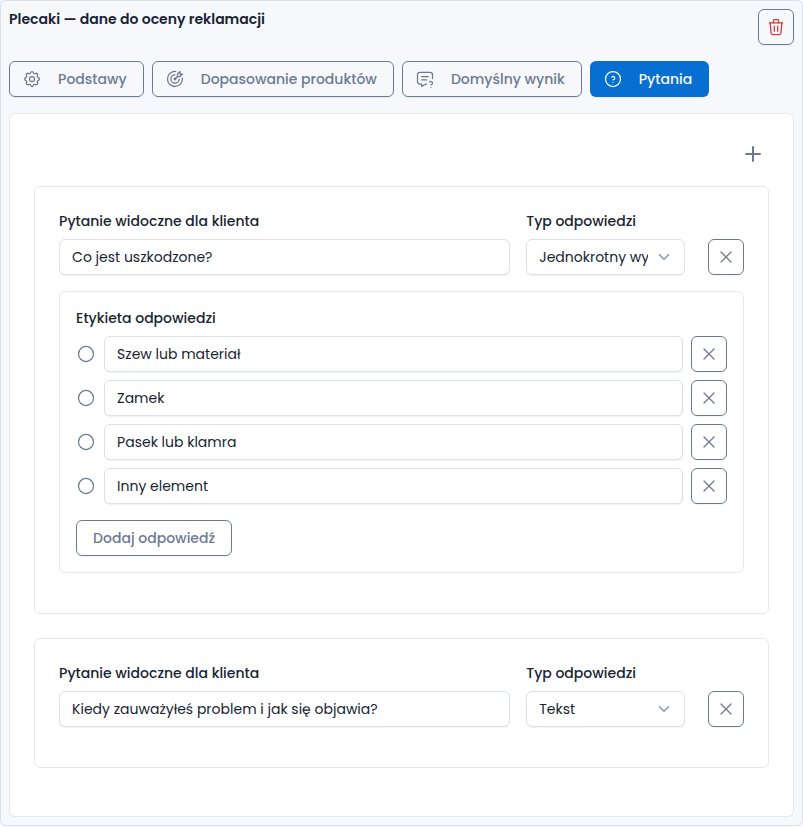
Example from the Polish interface: the customer selects the damaged part and describes the problem in their own words.
A yes/no question can also change the rule’s outcome and the message shown to the customer. This lets the form account for an additional detail about the product during submission.
Set the outcome and message
A rule can allow submission for the product or block it in the form. Add a message so the customer knows what to do next. A useful message explains the appropriate way to contact the store rather than leaving the buyer at a dead end.
Blocking submission is a form setting, not a decision on whether a claim is valid. Rules should reflect the store’s handling process. Answers that need a staff review still require someone to assess the case.
Availability and checks
Product rules are not supported for Allegro or the basic integration without order imports. They rely on product information supplied by a supported order integration.
Before publishing the form, test a product on the list and one outside it. If an answer changes the result, test both paths and read the message shown to the customer.
See the return and claim form for appearance settings and ways to publish the form on your store.